Categories
Methodologies

What’s the difference between Agile, Scrum, Kanban, Lean, Waterfall and XP?

Let’s break down, in a very simple manner, what all of these terms mean within the context of principles, processes, and methodologies in software engineering.

Agile

Agile is a set of principles, even called a philosophy or mindset. It emphasizes flexibility and adaptability, collaboration between all parties involved, frequent feedback and continuous improvement among others. For an overview of all these principles, please check the Agile Manifesto. Agile is an umbrella term that encompasses various methodologies, such as Scrum, Kanban and Lean.

Scrum

Scrum is a specific framework that implements Agile principles. It focuses on delivering small, incremental releases of working software. It defines roles, ceremonies, and artifacts, such as the Product Owner, Scrum Master, Development Team, Daily Standup, Sprint Planning, Sprint Retrospective, User Story, or Backlog, to guide teams in delivering software in short, time-boxed iterations called Sprints. Scrum values transparency, inspection and adaptation with a focus on continuous improvement and delivering value to the customer.

Kanban

Kanban is another agile methodology for software development that emphasizes visualizing work, limiting work in progress, and delivering work as soon as it is ready. It refrains from producing a surplus and thus eliminates waste, with developers pulling work instead of it being fed from a to do list or conveyor belt. Kanban is often used in situations where there is a continuous flow of work, rather than iterative time-boxed sprints. Kanban doesn’t have formal roles or ceremonies, it focuses more on managing flow and flexibility in terms of how the team works together.

Lean

Lean is a methodology that borrows heavily from Kanban, it focuses on optimizing flow and minimizing waste in all aspects of a process. This includes identifying and eliminating activities that do not add value to the end product, such as excess documentation, overproduction of features, and unnecessary waiting times. Lean encourages a continuous improvement cycle, fostering a culture of engagement, collaboration and constant learning. Lean is also less prescriptive than other Agile methodologies, and does not have formal roles, ceremonies, or artifacts.

Waterfall

Waterfall is a traditional software development methodology that is characterized by a linear, sequential approach. In this model, each phase of the development process is completed before moving on to the next phase. Unlike other methodologies, it is not iterative or incremental in nature, and it is also less flexible, as progress flows in one direction through phases that have dependencies on each sequential step of the cascade. Waterfall may be recommended when requirements are well understood, defined and not likely to change.

Extreme programming (XP)

Extreme programming is a methodology with an emphasis on practices such as continuous integration, test-driven development, pair programming, and frequent releases. It focuses mainly on the technical parts at the expense of project management and customer involvement, but can be an effective approach for teams that prioritize technical excellence, adaptability and collaboration.

Based on my experience, many workplaces do not have a strict requirement for which software development methodology to use, and a customized or hybrid approach that meets the specific needs of a project or organization is often the best choice.


Categories
Friday

C++ is very flexible

Categories
AWS Cloud Computing

Fixing an error occurred (LimitExceededException) when calling the CreateChangeSet operation

CloudFormation change sets allow you to preview how proposed changes might impact your resources. In certain scenarios these changes will pile up rendering an error as there are limits on the amount of change sets that you can have for a particular stack. Last time I contacted AWS support the limit was 1000 change sets.

This problem has been discussed before, you can read more about it here:

https://github.com/cloudtools/stacker/issues/508

https://github.com/serverless/serverless/issues/149

The solution is to create a script and clean all the change sets at once like it was done here:

https://cloudonaut.io/aws-cli-cloudformation-deploy-limit-exceeded/

I took that script and made it simpler as I already knew the offending stack in my setup. Don’t forget to replace YOUR_STACK_NAME (to whatever you named it of course) and YOUR_REGION (for example eu-central-1):

#!/bin/bash
cleanup() {
  changesets=$(aws cloudformation list-change-sets --stack-name YOUR_STACK_NAME --query 'Summaries[?Status==`FAILED`].ChangeSetId' --output text --region YOUR_REGION)
  for changeset in $changesets
    do
      echo "${stack}: deleting change set ${changeset}"
      aws cloudformation delete-change-set --change-set-name ${changeset} --region YOUR_REGION
    done
}
cleanup

Have your AWS CLI properly configured, save that script and run it like this.

bash /path/to/scriptname

Categories
Friday

A classic one

Categories
GIT Terminal

Setting up multiple SSH keys on Mac

1) Generate a new SSH key using the secure Ed25519 algorithm:

ssh-keygen -t ed25519 -C "your_email@example.com"

For legacy systems that don’t support that algorithm (like AWS’ CodeCommit) use the following:

ssh-keygen -t rsa -b 4096 -C "your_email@example.com"

2) When prompted, change the name of the file (key pair) if you want

3) Enter a strong passphrase

4) Repeat for as many keys as you need (for example as many GitHub, BitBucket, AWS or any other service that you want to use SSH keys with)

5) Copy the SSH public key and upload it to the respective service

pbcopy < ~/.ssh/id_ed25519.pub

6) Open your ~/.ssh/config file

open ~/.ssh/config

If the file doesn’t exist, create it like this (and then open it with the previous command):

touch ~/.ssh/config

7) Write your configuration so the machine understands you have multiple keys. The host has to be unique, the hostname is the service and the identity file is the key you’ve just created. Pay attention to the values that you will be filling. Here’s an example:

# Personal GitHub account
Host github.com
 HostName github.com
 User git
 AddKeysToAgent yes
 UseKeychain yes
 IdentityFile ~/.ssh/id_rsa
# Work GitHub account
Host github.com-work
 HostName github.com
 User git
 AddKeysToAgent yes
 UseKeychain yes
 IdentityFile ~/.ssh/id_rsa_work

8) Add each key to your machine’s SSH agent:

ssh-add -K ~/.ssh/id_ed25519

You can list all the keys added to the agent:

ssh-add -l

9) Clone your repositories in this manner, notice the -work after the domain, you set this value up previously in the config file:

git clone git@github.com-work:Homebrew/brew.git
Categories
Terminal

Speed up the tracking of your mouse in Mac

Type this command in the terminal to check the speed you are currently using:

defaults read -g com.apple.mouse.scaling

The default value is usually 3, increase it to your hearts content with this other command. I chose 7.0 as the value I like to use:

defaults write -g com.apple.mouse.scaling  7.0

Restart your machine.

Categories
Tutorials

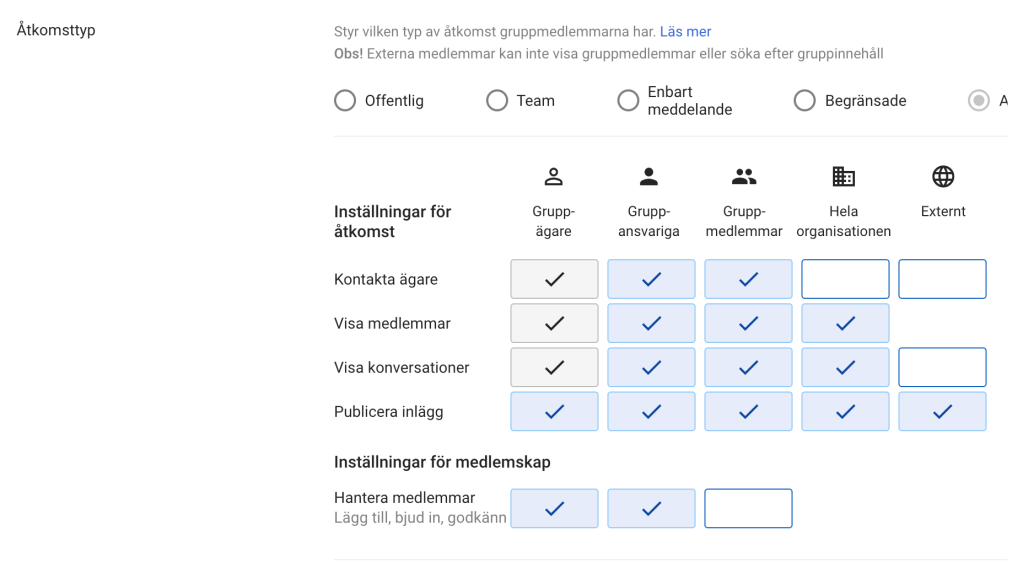
Making a google group email address publicly reachable

  1. Create the group email address, choose the members, etc. in groups.google.com
  2. Navigate to admin.google.com, then Groups and hover the mouse over the email address that you’ve created. Choose settings/preferences. Select “External” for the value of “who can publish entries or posts”.

Like this:

Support link: https://support.google.com/a/answer/167097

Categories
Server Terminal

Laravel’s Artisan Command Shortcuts

php artisan route:list
composer dump-autoload
Categories
Tutorials

Install Everything with Brew

Installing MySQL and running the service:

brew install mysql
brew services start mysql
Categories
Snippets

Compile SASS to style.css

Compile SASS to style.css (considering you already have installed compass I think)

sass --watch style.scss:../style.css
Design a site like this with WordPress.com
Get started